> ## Documentation Index
> Fetch the complete documentation index at: https://docs.wava.co/llms.txt
> Use this file to discover all available pages before exploring further.
# Daviplata
> Daviplata OTP verification payment flow.
# Daviplata Payment Flow
Daviplata is Davivienda's digital wallet. Payments require OTP (one-time password) verification — the buyer receives a code via SMS and you submit it to complete the payment.
## How it works
```mermaid theme={null}
sequenceDiagram
participant Merchant
participant Wava API
participant Daviplata
participant Buyer
Merchant->>Wava API: POST /v1/orders (national_id)
Wava API->>Daviplata: Initiate payment
Daviplata->>Buyer: SMS with OTP code
Wava API-->>Merchant: 200 OK (daviplata_token_required: true)
Buyer->>Merchant: Provides OTP
Merchant->>Wava API: POST /v1/orders/daviplata/{orderId} (OTP)
Wava API->>Daviplata: Validate OTP
Daviplata-->>Wava API: Payment confirmed
Wava API-->>Merchant: 200 OK (status: confirmed)
```
Call `POST /v1/orders` with the buyer's `id_number`, `id_type`, and the Daviplata gateway ID.
Daviplata sends a 6-digit OTP to the buyer via SMS. Your application should display a form for the buyer to enter this code.
Call `POST /v1/orders/daviplata/{orderId}` with the OTP the buyer entered.
If the OTP is valid, the payment completes immediately and the response includes `status: confirmed`.
## Customer experience
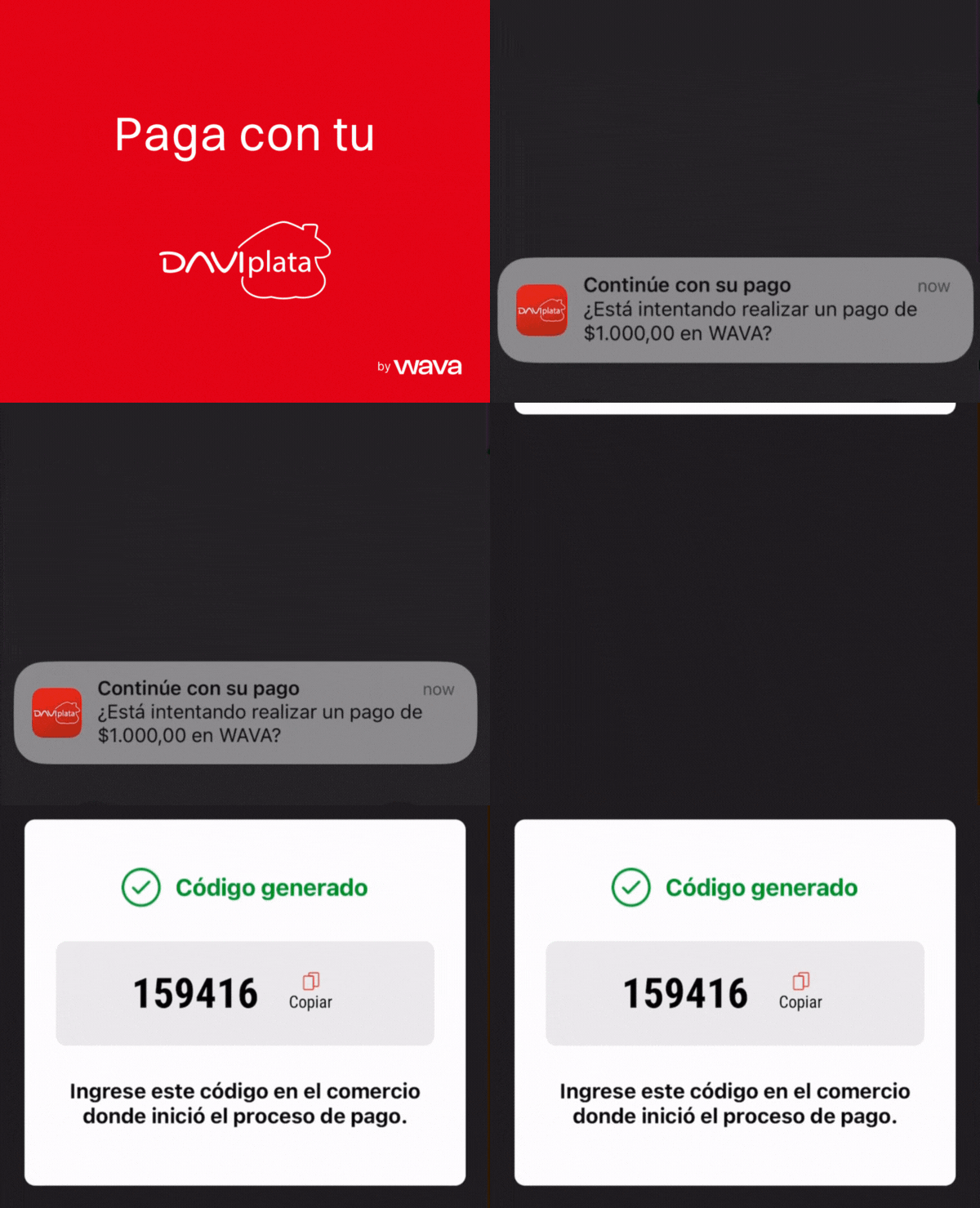
1. Customer receives push notification with an OTP on their phone
2. Opens Daviplata app to review payment details
3. Takes OTP provided by Daviplata app and pastes it in the Merchant's checkout
4. Receives payment confirmation in-app
## Suggested UX implementation
### Show these steps to the user (in Spanish)
Display the following instructions to the buyer while waiting for the OTP:
1. **Recibirás una notificación con un OTP de 6 dígitos**
2. **Copia el OTP e ingrésalo en el sistema**
3. **Tu compra será procesada de manera automática**
### Processing animation
Use the following GIF to give the buyer visual context during the OTP flow:
```
https://wava-assets.s3.us-east-1.amazonaws.com/payment-gateways/daviplata-flow-2025.gif
```
 ## Required fields
| Field | Required | Description |
| ---------------------- | -------- | -------------------------------------------------------------- |
| `shopper.id_number` | Yes | Buyer's national ID (cedula) |
| `shopper.id_type` | Yes | Document type ID from [Document Types](/orders/document-types) |
| `shopper.email` | Yes | Buyer's email |
| `shopper.phone_number` | Yes | Buyer's phone number |
| `shopper.country` | Yes | `CO` |
Daviplata only accepts the following document types: **CC** (Cédula de Ciudadanía, ID 1), **CE** (Cédula de Extranjería, ID 2), and **TI** (Tarjeta de Identidad, ID 3). Sending any other document type will result in a payment error.
## Example: Create order
```bash theme={null}
curl -X POST "https://api.wava.co/v1/orders" \
-H "merchant-key: YOUR_MERCHANT_KEY" \
-H "Content-Type: application/json" \
-d '{
"amount": 75000,
"description": "Product purchase",
"currency": "COP",
"shopper": {
"first_name": "Maria",
"last_name": "Gonzalez",
"email": "maria@email.com",
"phone_number": "+573001234567",
"country": "CO",
"id_number": "12345678",
"id_type": 1
},
"payment_gateway": {
"id_payment_gateway": 2
},
"order_key": "order-67890"
}'
```
The response will include `daviplata_token_required: true`:
```json theme={null}
{
"data": {
"id_order": 12346,
"status": "processing",
"daviplata_token_required": true,
"payment_gateway": {
"daviplata": {
"national_id_number": "****678",
"id_national_document_type": 1,
"id_type": "CC"
}
}
}
}
```
## Example: Submit OTP
```bash theme={null}
curl -X POST "https://api.wava.co/v1/orders/daviplata/12346" \
-H "merchant-key: YOUR_MERCHANT_KEY" \
-H "Content-Type: application/json" \
-d '{
"daviplata_otp": "123456"
}'
```
## Document types
Use `GET /v1/national-document-types/CO` to retrieve valid document types. See [Document Types](/orders/document-types) for details.
For Daviplata, only these types are accepted:
| ID | Code | Description |
| -- | ---- | --------------------- |
| 1 | CC | Cédula de Ciudadanía |
| 2 | CE | Cédula de Extranjería |
| 3 | TI | Tarjeta de Identidad |
## Development testing
In the sandbox, use the following OTP codes:
| OTP Code | Result |
| --------------- | ------------------ |
| `123456` | Success |
| `000000` | Success |
| `111111` | Success |
| `999999` | Error: invalid OTP |
| Any other value | Error: invalid OTP |
See [Test Data](/testing/test-data) for more test values.
## Required fields
| Field | Required | Description |
| ---------------------- | -------- | -------------------------------------------------------------- |
| `shopper.id_number` | Yes | Buyer's national ID (cedula) |
| `shopper.id_type` | Yes | Document type ID from [Document Types](/orders/document-types) |
| `shopper.email` | Yes | Buyer's email |
| `shopper.phone_number` | Yes | Buyer's phone number |
| `shopper.country` | Yes | `CO` |
Daviplata only accepts the following document types: **CC** (Cédula de Ciudadanía, ID 1), **CE** (Cédula de Extranjería, ID 2), and **TI** (Tarjeta de Identidad, ID 3). Sending any other document type will result in a payment error.
## Example: Create order
```bash theme={null}
curl -X POST "https://api.wava.co/v1/orders" \
-H "merchant-key: YOUR_MERCHANT_KEY" \
-H "Content-Type: application/json" \
-d '{
"amount": 75000,
"description": "Product purchase",
"currency": "COP",
"shopper": {
"first_name": "Maria",
"last_name": "Gonzalez",
"email": "maria@email.com",
"phone_number": "+573001234567",
"country": "CO",
"id_number": "12345678",
"id_type": 1
},
"payment_gateway": {
"id_payment_gateway": 2
},
"order_key": "order-67890"
}'
```
The response will include `daviplata_token_required: true`:
```json theme={null}
{
"data": {
"id_order": 12346,
"status": "processing",
"daviplata_token_required": true,
"payment_gateway": {
"daviplata": {
"national_id_number": "****678",
"id_national_document_type": 1,
"id_type": "CC"
}
}
}
}
```
## Example: Submit OTP
```bash theme={null}
curl -X POST "https://api.wava.co/v1/orders/daviplata/12346" \
-H "merchant-key: YOUR_MERCHANT_KEY" \
-H "Content-Type: application/json" \
-d '{
"daviplata_otp": "123456"
}'
```
## Document types
Use `GET /v1/national-document-types/CO` to retrieve valid document types. See [Document Types](/orders/document-types) for details.
For Daviplata, only these types are accepted:
| ID | Code | Description |
| -- | ---- | --------------------- |
| 1 | CC | Cédula de Ciudadanía |
| 2 | CE | Cédula de Extranjería |
| 3 | TI | Tarjeta de Identidad |
## Development testing
In the sandbox, use the following OTP codes:
| OTP Code | Result |
| --------------- | ------------------ |
| `123456` | Success |
| `000000` | Success |
| `111111` | Success |
| `999999` | Error: invalid OTP |
| Any other value | Error: invalid OTP |
See [Test Data](/testing/test-data) for more test values.