> ## Documentation Index
> Fetch the complete documentation index at: https://docs.wava.co/llms.txt
> Use this file to discover all available pages before exploring further.
# Nequi
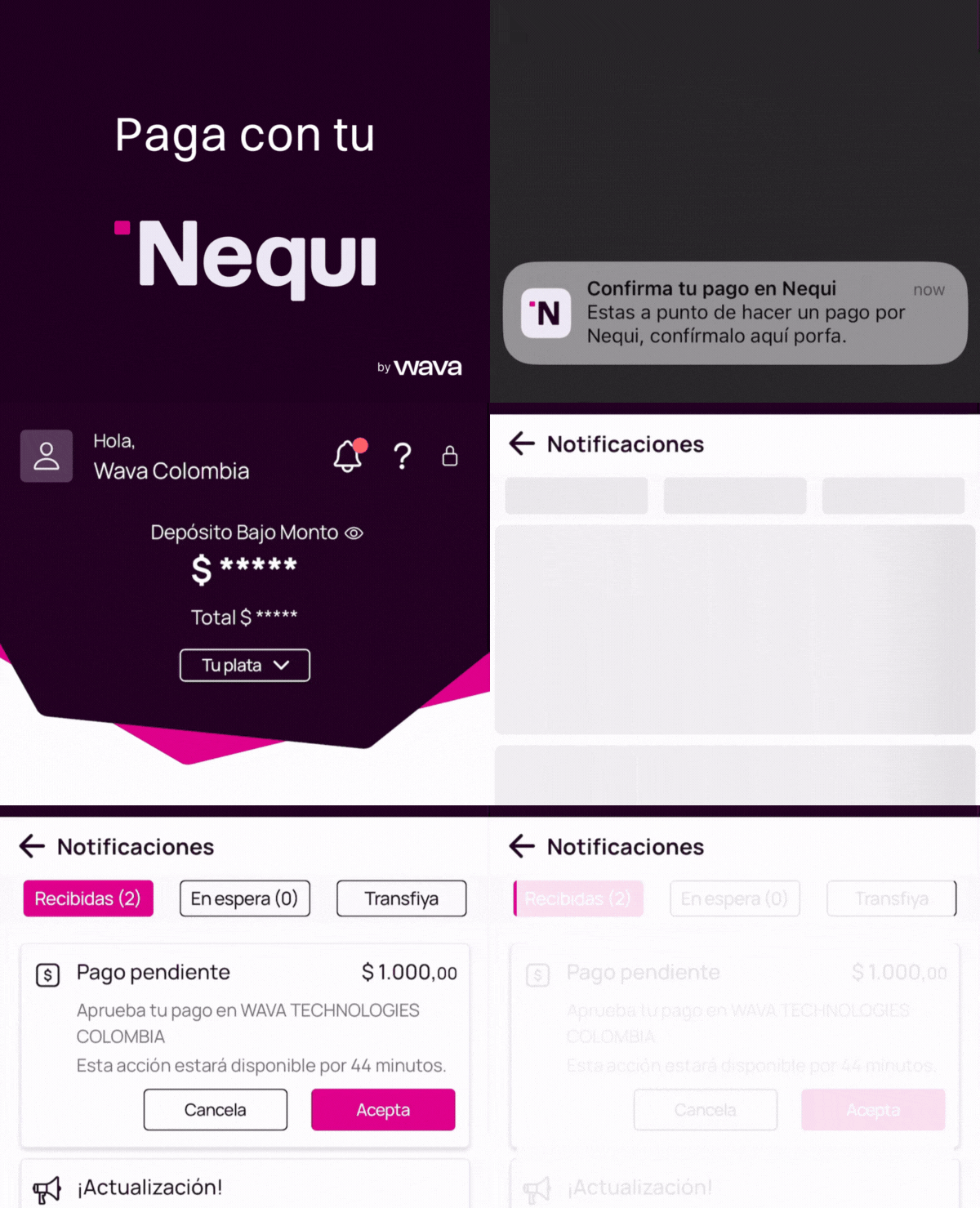
> Nequi push notification payment flow.
# Nequi Payment Flow
Nequi is Colombia's leading mobile wallet. Payments are completed via push notification — the buyer approves the payment directly in their Nequi app.
## How it works
```mermaid theme={null}
sequenceDiagram
participant Merchant
participant Wava API
participant Nequi
participant Buyer
Merchant->>Wava API: POST /v1/orders (phone_number)
Wava API->>Nequi: Initiate payment request
Nequi->>Buyer: Push notification
Wava API-->>Merchant: 200 OK (status: processing)
Buyer->>Nequi: Approve payment
Nequi->>Wava API: Payment confirmed
Wava API->>Merchant: Webhook (status: confirmed)
```
Call `POST /v1/orders` with the buyer's `phone_number`, `id_number`, `id_type`, and the `id_payment_gateway` for Nequi.
Nequi sends a push notification to the buyer's phone. The buyer opens the Nequi app and approves the payment.
Once the buyer approves, the order status changes to `confirmed`. You receive a webhook notification, or you can poll for the status.
## Customer experience
1. Customer receives push notification on their phone
2. Opens Nequi app to review payment details
3. Confirms or rejects the payment within the Nequi app
4. Receives confirmation within the app
## Suggested UX implementation
### Show these steps to the user (in Spanish)
Display the following instructions to the buyer while waiting for payment approval:
1. **Recibirás una notificación push en tu teléfono**
2. **Revisa los datos y acepta el cobro**
3. **Tu compra se procesará automáticamente**
### Processing animation
Use the following GIF to give the buyer visual context while waiting for them to approve the payment in Nequi:
```
https://wava-assets.s3.us-east-1.amazonaws.com/payment-gateways/nequi-flow-2025.gif
```
 ## Required fields
| Field | Required | Description |
| ------------------------------------ | -------- | -------------------------------------------------------------- |
| `shopper.phone_number` | Yes | The buyer's Nequi-registered phone number |
| `shopper.email` | Yes | Buyer's email |
| `shopper.country` | Yes | `CO` |
| `shopper.id_number` | Yes | Buyer's national ID number (required for compliance) |
| `shopper.id_type` | Yes | Document type ID from [Document Types](/orders/document-types) |
| `payment_gateway.id_payment_gateway` | Yes | Nequi gateway ID from `/v1/orders/paymentGateways` |
## Example request
```bash theme={null}
curl -X POST "https://api.wava.co/v1/orders" \
-H "merchant-key: YOUR_MERCHANT_KEY" \
-H "Content-Type: application/json" \
-d '{
"amount": 50000,
"description": "Premium subscription",
"currency": "COP",
"shopper": {
"first_name": "Juan",
"last_name": "Perez",
"email": "juan@email.com",
"phone_number": "+573001234567",
"country": "CO",
"id_number": "1234567890",
"id_type": 1
},
"payment_gateway": {
"id_payment_gateway": 1
},
"order_key": "order-12345"
}'
```
## Example response
```json theme={null}
{
"data": {
"id_order": 12345,
"status": "processing",
"payment_gateway": {
"nequi": {
"phone_number": "****567"
}
}
}
}
```
## Important notes
* The buyer has a limited time window to approve the push notification before it expires.
* If the notification expires, the order remains in `processing` status. You can cancel it and create a new one.
* While Nequi uses the phone number for the push notification, national ID fields (`id_number` and `id_type`) are required on all direct API orders for compliance purposes.
## Development testing
In the sandbox, Nequi push notifications are simulated. To confirm an order, call `GET /v1/orders/{orderId}` with the order ID. This call will automatically confirm the order and trigger the webhook.
```bash theme={null}
# In development: this call auto-confirms the Nequi order
curl -X GET "https://api.dev.wava.co/v1/orders/12345" \
-H "merchant-key: YOUR_DEV_MERCHANT_KEY"
```
See [Test Data](/testing/test-data) for test phone numbers.
## Required fields
| Field | Required | Description |
| ------------------------------------ | -------- | -------------------------------------------------------------- |
| `shopper.phone_number` | Yes | The buyer's Nequi-registered phone number |
| `shopper.email` | Yes | Buyer's email |
| `shopper.country` | Yes | `CO` |
| `shopper.id_number` | Yes | Buyer's national ID number (required for compliance) |
| `shopper.id_type` | Yes | Document type ID from [Document Types](/orders/document-types) |
| `payment_gateway.id_payment_gateway` | Yes | Nequi gateway ID from `/v1/orders/paymentGateways` |
## Example request
```bash theme={null}
curl -X POST "https://api.wava.co/v1/orders" \
-H "merchant-key: YOUR_MERCHANT_KEY" \
-H "Content-Type: application/json" \
-d '{
"amount": 50000,
"description": "Premium subscription",
"currency": "COP",
"shopper": {
"first_name": "Juan",
"last_name": "Perez",
"email": "juan@email.com",
"phone_number": "+573001234567",
"country": "CO",
"id_number": "1234567890",
"id_type": 1
},
"payment_gateway": {
"id_payment_gateway": 1
},
"order_key": "order-12345"
}'
```
## Example response
```json theme={null}
{
"data": {
"id_order": 12345,
"status": "processing",
"payment_gateway": {
"nequi": {
"phone_number": "****567"
}
}
}
}
```
## Important notes
* The buyer has a limited time window to approve the push notification before it expires.
* If the notification expires, the order remains in `processing` status. You can cancel it and create a new one.
* While Nequi uses the phone number for the push notification, national ID fields (`id_number` and `id_type`) are required on all direct API orders for compliance purposes.
## Development testing
In the sandbox, Nequi push notifications are simulated. To confirm an order, call `GET /v1/orders/{orderId}` with the order ID. This call will automatically confirm the order and trigger the webhook.
```bash theme={null}
# In development: this call auto-confirms the Nequi order
curl -X GET "https://api.dev.wava.co/v1/orders/12345" \
-H "merchant-key: YOUR_DEV_MERCHANT_KEY"
```
See [Test Data](/testing/test-data) for test phone numbers.