
Daviplata Payment Flow

Daviplata is Davivienda’s digital wallet. Payments require OTP (one-time password) verification — the buyer receives a code via SMS and you submit it to complete the payment.

How it works

1

Create order

Call POST /v1/orders with the buyer’s id_number, id_type, and the Daviplata gateway ID.
2

Buyer receives OTP

Daviplata sends a 6-digit OTP to the buyer via SMS. Your application should display a form for the buyer to enter this code.
3

Submit OTP

Call POST /v1/orders/daviplata/{orderId} with the OTP the buyer entered.
4

Payment confirmed

If the OTP is valid, the payment completes immediately and the response includes status: confirmed.

Customer experience

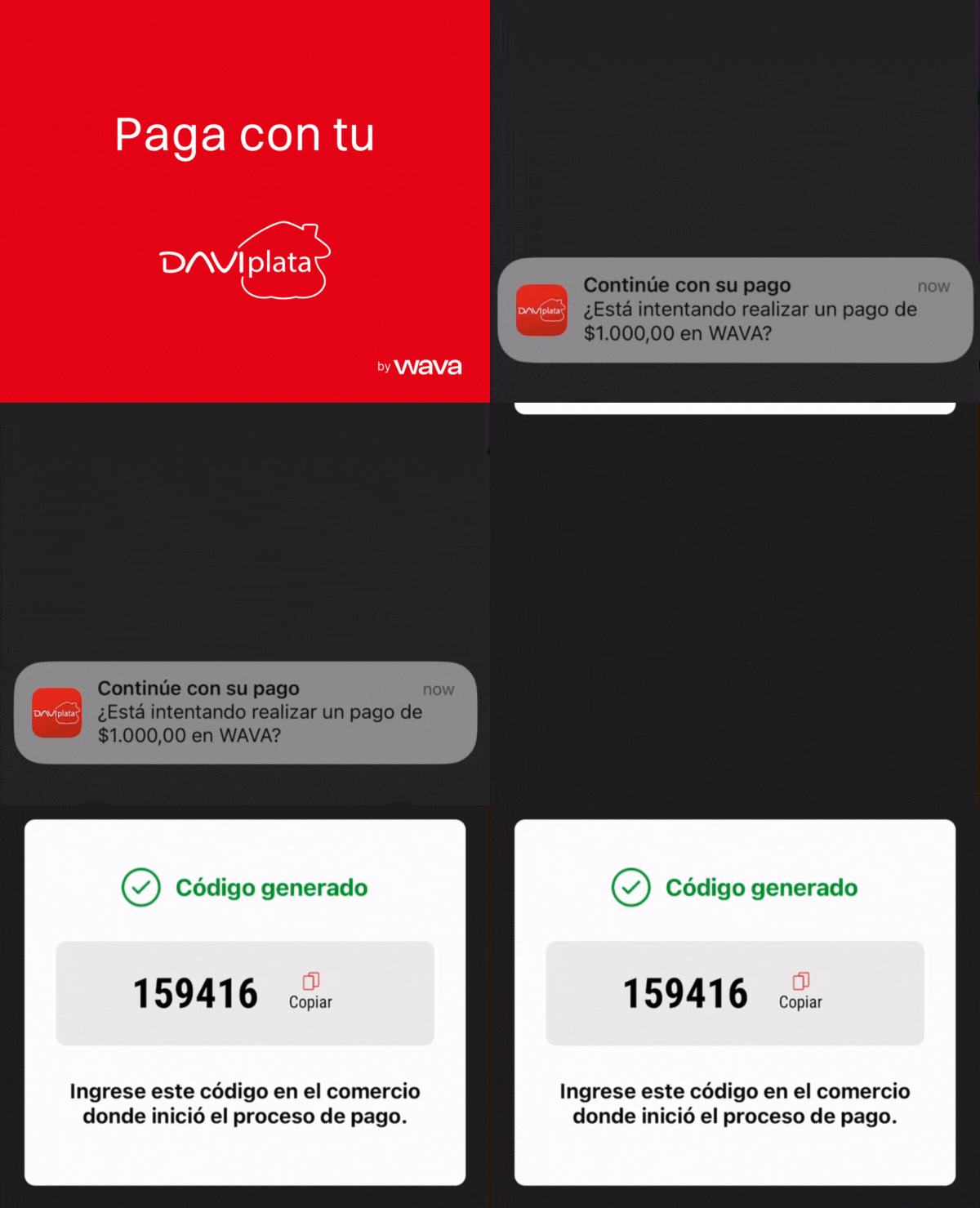
  1. Customer receives push notification with an OTP on their phone
  2. Opens Daviplata app to review payment details
  3. Takes OTP provided by Daviplata app and pastes it in the Merchant’s checkout
  4. Receives payment confirmation in-app

Suggested UX implementation

Show these steps to the user (in Spanish)

Display the following instructions to the buyer while waiting for the OTP:
  1. Recibirás una notificación con un OTP de 6 dígitos
  2. Copia el OTP e ingrésalo en el sistema
  3. Tu compra será procesada de manera automática

Processing animation

Use the following GIF to give the buyer visual context during the OTP flow:
https://wava-assets.s3.us-east-1.amazonaws.com/payment-gateways/daviplata-flow-2025.gif
Daviplata payment flow animation

Required fields

FieldRequiredDescription
shopper.id_numberYesBuyer’s national ID (cedula)
shopper.id_typeYesDocument type ID from Document Types
shopper.emailYesBuyer’s email
shopper.phone_numberYesBuyer’s phone number
shopper.countryYesCO
Daviplata only accepts the following document types: CC (Cédula de Ciudadanía, ID 1), CE (Cédula de Extranjería, ID 2), and TI (Tarjeta de Identidad, ID 3). Sending any other document type will result in a payment error.

Example: Create order

curl -X POST "https://api.wava.co/v1/orders" \
  -H "merchant-key: YOUR_MERCHANT_KEY" \
  -H "Content-Type: application/json" \
  -d '{
    "amount": 75000,
    "description": "Product purchase",
    "currency": "COP",
    "shopper": {
      "first_name": "Maria",
      "last_name": "Gonzalez",
      "email": "maria@email.com",
      "phone_number": "+573001234567",
      "country": "CO",
      "id_number": "12345678",
      "id_type": 1
    },
    "payment_gateway": {
      "id_payment_gateway": 2
    },
    "order_key": "order-67890"
  }'
The response will include daviplata_token_required: true:
{
  "data": {
    "id_order": 12346,
    "status": "processing",
    "daviplata_token_required": true,
    "payment_gateway": {
      "daviplata": {
        "national_id_number": "****678",
        "id_national_document_type": 1,
        "id_type": "CC"
      }
    }
  }
}

Example: Submit OTP

curl -X POST "https://api.wava.co/v1/orders/daviplata/12346" \
  -H "merchant-key: YOUR_MERCHANT_KEY" \
  -H "Content-Type: application/json" \
  -d '{
    "daviplata_otp": "123456"
  }'

Document types

Use GET /v1/national-document-types/CO to retrieve valid document types. See Document Types for details. For Daviplata, only these types are accepted:
IDCodeDescription
1CCCédula de Ciudadanía
2CECédula de Extranjería
3TITarjeta de Identidad

Development testing

In the sandbox, use the following OTP codes:
OTP CodeResult
123456Success
000000Success
111111Success
999999Error: invalid OTP
Any other valueError: invalid OTP
See Test Data for more test values.